

At some higher education institutions, you can earn credits for using Xeropan as a student. You can find the exact requirements for determining your practical grade in the course description.
Tracking your performance by semester in the app:
You can follow your current results in the “My Profile” section.
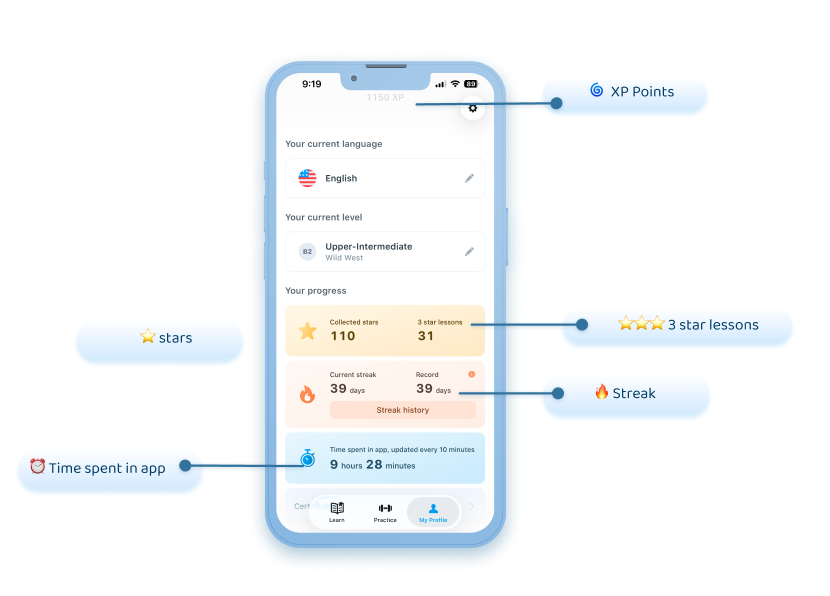
Important: The app shows your overall learning progress, which means that results from previous semesters may also be visible. However, when determining your grade, only the results achieved during the current semester are taken into account.
Since higher education institutions may apply different semester periods, the app currently cannot display a unified, institution-specific semester statistic or expected grade.
How can you start the new semester with a clean slate?
To make tracking your progress easier, we recommend that at the beginning of the semester you:
take a screenshot of your current results so you can refer back to your starting point later;
or request the deletion of your current results, allowing you to start learning from a clean slate (from 0).
You can request the deletion of your results by emailing neptun@xeropan.com and providing your user ID. You can find your user ID here: My Profile → settings (gear icon) → scroll to the bottom of the page
What happens if you missed these steps?
If you did not take a screenshot and did not request the deletion of your results, it is still possible to review your progress for a specific period.
To do this, you need to provide your Neptun code and the relevant period. You can submit your request by emailing neptun@xeropan.com.
🔗 For more information, please read our FAQ article:
How can you track your progress and how does the app evaluate?